


TYPE-C to 3-in-1 Docking Station
A laptop with a single USB-C port often cannot charge and connect a monitor simultaneously. Smaller hubs solve the bigger multi-port problem with unnecessary bulk. The TYPE-C to 3-in-1 Docking Station offers a simpler, more focused alternative.
Solving the Everyday Connectivity Gap
This docking station expands one USB-C port into three essential connections. It covers display output, data transfer, and charging without unnecessary extras. Setup is plug-and-play, with no drivers needed on most systems.
Display Output Without Extra Hardware
An HDMI port allows direct connection to monitors, TVs, or projectors. This adds external display support to laptops that only have USB-C natively. Mirroring or extending the screen becomes possible without a separate adapter.
Data Transfer for Everyday Peripherals
A USB-A port supports flash drives, mice, keyboards, and similar accessories. This restores practical USB-A connectivity that many newer laptops have removed. Everyday peripherals connect without needing a separate adapter cable.
Charging That Doesn’t Interrupt Use
A USB-C PD passthrough port keeps the laptop charged during use. This avoids needing to unplug the dock just to charge the device. Power and connectivity work together rather than competing for the same port.
Verified Docking Station Specifications
These specifications reflect the standard three-port configuration in this category.
Core Port Configuration
The dock typically includes one HDMI output, one USB-A data port, and one USB-C PD passthrough port. This compact arrangement covers the most common everyday connectivity needs. It avoids the bulk of larger, feature-heavy docking stations.
- Video output: HDMI, supporting common display resolutions
- Data port: USB-A for peripherals and storage
- Charging: USB-C PD passthrough support
- Build: compact, lightweight housing
- Setup: plug-and-play, no drivers required
- Compatibility: USB-C laptops, tablets, and select phones
General USB-C hub standards are documented through USB Implementers Forum.
Where This Docking Station Makes the Difference
This compact dock suits situations where simplicity matters more than maximum expansion.
Travelers Needing a Lightweight Solution
A smaller dock takes up far less space in a laptop bag or backpack. Travelers benefit from basic display and USB-A access without added bulk. It covers most common travel connectivity needs efficiently.
Students With Basic Connectivity Needs
Many students only need a flash drive port and an occasional monitor connection. This dock covers both without the cost of a larger docking station. It remains an affordable option for everyday coursework.
Minimalist Desk Setups
Some users prefer a clean desk with only essential cables and devices. This dock supports a monitor and one peripheral without added clutter. Its compact size suits smaller desks or shared workspaces.
Quick Presentation Connections
Presenters occasionally need a fast way to connect a laptop to a projector. This dock provides that HDMI link without unnecessary additional ports. It remains simple enough for non-technical users to operate confidently.
Backup or Secondary Dock Use
Some users keep a smaller dock as a backup for basic tasks. This avoids relying on a single larger dock for every situation. It also works well as a spare for guest or shared devices.
The Big Mind Technologies Guarantee
Big Mind Technologies stocks dependable docking stations suited to simple, everyday connectivity needs. Every product listed is checked for build quality before reaching our catalog. Our team can help confirm the right dock for your setup.
Order the TYPE-C to 3-in-1 Docking Station from Big Mind Technologies and simplify your basic connectivity needs today.








 No products in the cart.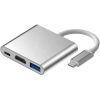
Reviews
There are no reviews yet.